Mix-and-match bundles from your collections
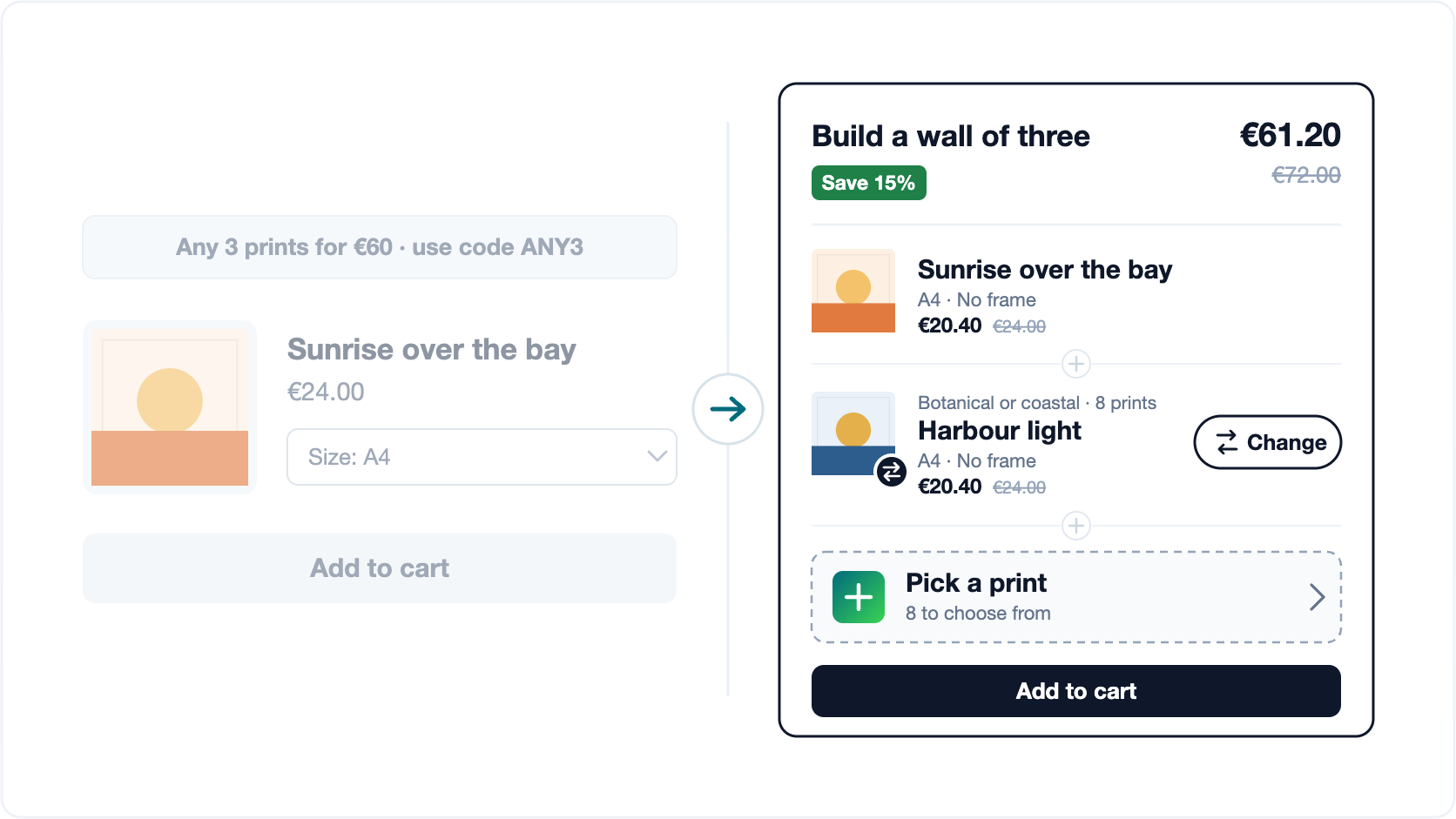
Some stores do not sell a product. They sell a range: forty prints, sixty discs, a shelf of candle scents. Nobody comes in for “this one”. They come in for “three of these”, and the offer that sells a range is always some version of pick any three. This post is for you if:
- You sell a range, not a product. Art prints, discs, candles, socks, teas, nail colours: the shopper wants a few, and wants to choose which.
- Your best offer lives in a banner. “Any 3 prints for €60” or “mix and match 4 for 3”, spelled out above the header or behind a discount code.
- You sell things that belong together. An extra print with a portrait, a frame for the print, a spare with the main piece.
- Your collections are big. Dozens of designs, each in sizes or finishes, sometimes spread across several collections.
Quick test: if the words any or mix and match appear anywhere in your offers, this is about you.
Any three, in a banner and a discount code
The instinct behind that banner is exactly right. A shop with a range knows its customers buy in sets, so it says so. Then the tooling runs out. The offer ends up in a banner the shopper has to remember, a code they have to type at checkout, or a separate “bundle” listing that fixes the three designs for them. None of it happens where the decision is made: on the product page, with the design they are looking at already in their head.
What that shopper needs is short. This print, plus two more of their choosing, with the saving in front of them while they pick.
A bundle that does the choosing on the product page
 Sunrise over the bay€20.40
 Pick 2 more to complete the set
That is a bundle with collection slots. The product on the page is the first item. Each slot draws from a collection you choose, or from several at once, so “botanical or coastal” is one slot, not two. The shopper taps a slot and sees every print they can actually buy right now: sold-out and hidden products never appear, a print that sits in two collections shows once, and a filter narrows the choice to one collection.
Sizes, colours and frames are picked in the same sheet, with the price of that exact combination, so nobody leaves the page to configure a product. And there is nothing to redeem: the cart applies the discount to exactly the products in the set.
Pick for them, or let them pick
Every bundle starts one of two ways, and it is one tick in the editor.
- Preselected. Each slot opens on a product you chose, usually a bestseller, with a clear Change button beside it. The set is complete from the first second, so adding it to the cart is one tap. Best when most shoppers are happy with your pick and some want to swap.
- Shopper picks. Each slot starts as a “Pick a print” card. Choosing is the point, so the page asks for it, and if someone presses Add to cart with a slot still empty, the chooser opens on that slot instead of adding half a set. Best for gifts, sets and anything personal.
Prices per piece are optional in both: show what each one costs, or only the bundle total and the saving.
Say it the way your shop says it
The words around a slot are yours. A slot can read “Your second print · {{product-count}} to choose from”, and {{product-count}} becomes the number of prints the shopper can actually pick, the same number the chooser shows. {{collection-name}} names the collections a slot draws from. Leave a slot’s text blank and it uses your shop-wide wording, which you write once.
Every one of those texts, per slot and shop-wide, translates on the Translations page. A shopper browsing in German never meets an English “Pick a product”.
Add-ons that belong with the product
Slots are not only for ranges. A slot with a single product in it is an add-on, offered at the moment it makes sense: an extra print of a custom portrait, a frame cut for the print, a care kit next to the boots. The shopper sees it on the product they have already decided on, priced as part of the set, one tap to include.
Before you build one: a collection that holds the products
A slot draws from a collection, so the collection has to contain the products itself. It is surprisingly easy for one to look full and hold nothing: a menu item or a landing page can gather several collections under one name while that name, as a collection, stays empty.
The check takes ten seconds. Open yourstore.com/collections/your-collection in a private window. If the products are listed there, a slot can use it. If the page is empty, add the products to that collection (or choose the one that actually holds them) and the slot fills in.
On a real store: burnt peach
burnt peach makes custom silhouette portraits, bold quote prints, organic sweatshirts and graphic tees, much of it printed to order. That is a catalogue with more options than most themes were designed for, and they sell it with collection slots: next to the piece a shopper is looking at, they can add more of their own choosing and save on the set. In their words, from their review on the Shopify App Store:
This is the best bundling app I’ve come across. If it can work on my site it can work on any!
If your best offer starts with any, put it on the product page. MaxValue AI Bundles builds the set from your collections, lets the shopper choose, and prices it in the cart. And if your catalogue is the bespoke kind, tell us about it: we will set it up with you.